
Find the leaks costing you time and money:
A 6-step process audit for your marketing, sales and delivery workflows

A client books a call with you. Great news.
Then the little jobs start. You check they've paid. You copy their details into your notes. You send a reminder the day before, if you remember. And when they don't turn up, you're back in your inbox writing a "no worries, want to reschedule?" email for the third time this month.
Sound familiar?
None of those jobs are hard on their own. But stacked together, week after week, they quietly eat your time and your headspace. And because most of it lives in your head, it's hard to see where things are going wrong.
That's what a process audit is for. It's a simple, honest look at how something in your business runs right now, step by step, so you can spot the friction and make it easier (for you AND your clients)
You don't need fancy software to do this. A spreadsheet, a notebook or the back of an envelope will do.
After reading this, you'll have a clear picture of one process and at least one small change you can make this week.
Let's get stuck in!
What a Process Audit Is (and why it's worth an hour of your time)
A process or workflow is any repeatable way you do something in your business. Booking a client. Posting on social media. Sending an invoice. It doesn't need to involve tech to count.
Most of us never stop to look at our processes. We build them on the fly, add a step here and a workaround there, and before long the thing that used to take five minutes takes half the afternoon.
A process audit helps you see:
- What you're doing, one step at a time
- Which tools are involved at each step
- Where your time goes and where things fall through the cracks
Once you can see it, you can start to fix it.
Think pantry clean-out, not shopping list
Think of it like cleaning out your pantry. You can't work out what to buy until you've pulled everything out and had a look. The three open packets of rice. The jar at the back you forgot you owned.
Or the protein powder I spent 10 minutes hunting for last week, gave up on, and reordered. The original turned up two days later, sitting behind the cereal.
Your processes work the same way. Get it all out first, then decide what stays, what goes and what needs a better home.
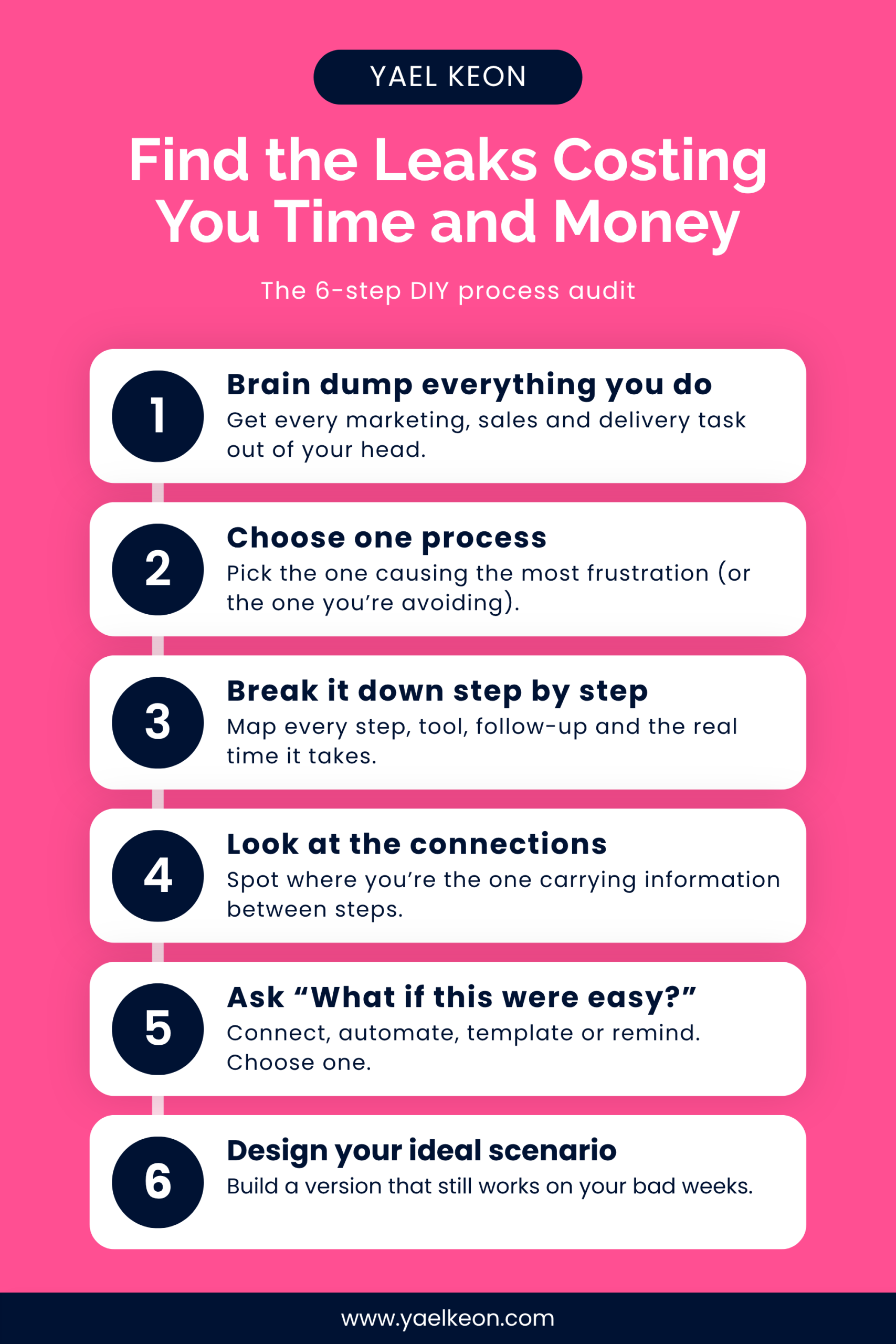
Step 1: Brain dump everything you do (get it out of your head)
(Or if you already know which process is doing your head in you can skip straight to step 3)
Grab a notebook or open a blank spreadsheet, and write down every task you do to keep your business running. We're focusing on three areas: marketing, sales and delivery.
Think about what you do daily, weekly, monthly and even once a quarter. What did you do this morning? What happens every Monday? What's the end-of-month job you dread?
Here are some prompts to get you started.
Marketing processes might include:
- Writing and scheduling social media posts
- Sending your email newsletter
- Replying to comments and DMs
- Writing a blog post or recording a podcast episode
- Collaboration outreach and followups
- Checking your stats at the end of the month
Sales processes might include:
- Replying to enquiries
- Booking discovery calls
- Sending quotes or proposals
- Following up people who haven't replied
- Taking payments and sending invoices
- Chasing late payments
Delivery processes might include:
- Onboarding a new client (welcome email, contract, intake form)
- Booking and running client sessions
- Sending session notes, recordings or next steps
- Packing and posting orders, if you sell products
- Answering client questions and support requests
- Asking for feedback or a testimonial at the end
Don't sort it or judge it yet. Getting it out of your head and onto paper is the win at this stage.
Quick tip: keep a note open on your phone or a notepad at your desk for a week and add to it every time you catch yourself doing a task. You'll be surprised how much turns up that you'd never have listed from memory.
Step 2: Choose one process to dive into
One. Not five.
If you're stuck on which one, choose the one that:
- Causes you the most overwhelm or frustration
- Would have the biggest impact on your sales or revenue
- Would make the biggest difference to your clients, especially where people are dropping off or your service isn't where you'd like it to be
Or pick the one you’ve been avoiding so hard you’d rather clean the oven. Yes, that one.
And if you skipped Step 1 because you already know which process is driving you up the wall? Great. Start right here. Maybe you've been doing a task and thought, "Why do I have to do three extra steps every single time?" That's your process. You don't need the full brain dump to begin.
Choosing one keeps this doable, and doable is what gets finished.
Step 3: Break it down step by step (honestly)
Now for the meaty bit. You're going to write out every step in your chosen process, in order.
Let's use a client booking a call as the example. Start from the moment they decide to book. How do they book in? How do they pay? What confirmation do they get? What reminders go out before the call?
If you're using a spreadsheet, set up these columns:
- The step: what happens, in order. For example, "Client books a time" then "Client pays"
- The tech or tools: anything you use at that step. It could be Calendly, your email inbox, a paper planner or the notepad next to your laptop. It all counts
- Time taken: how long it takes you, every time. Include the time it takes to psych yourself up, find the right file and remember where you were up to
- If they don't do the thing: what happens when a client doesn't book, pay or reply? What follow-ups do you have to send, and how many?
- The honest look: where does it go wrong? Where's the frustration coming from? Are you getting to it on time, or is it sitting in your inbox for three days?
And for bonus points if you have a sample of the standard type of email you send. Copy & paste the text or save it in a companion document.
Want an example? One row might look like this:
Step: Send invoice. Tech: my accounting software and my inbox. Time taken: 10 minutes. If they don't pay: I chase them by email, sometimes twice. The honest look: I often forget to follow up on payment until the day before the call.
This isn't the ideal-world version. Write down what happens, not what's meant to happen. You're not doing it wrong. You're getting an honest picture, and an honest picture is what makes the next two steps work.
Step 4: Look at the connections
Now look at the gaps between your steps. How does someone move from step one to step two? And from step two to step three?
For each connection, ask:
- Does this happen on its own (automated), or do I have to make it happen?
- If it's on me, how do I remember to do it?
- What information has to move across, and how does it get there?
And if the step doesn't happen, are automated reminders in place?
Watch for the copy and paste. If you're typing a client's name and email from one tool into another, you're the connection. You're the one holding it all together, and that's a big job to carry on top of everything else.
These gaps are where clients slip through, and where your evenings disappear. Finding them is half the fix.
Step 5: Ask "What if this were easy?"
Go back to your breakdown and find the step that's causing the most friction. Then ask one question: what would make this easy?
Not perfect. Easier.
A few prompts to get you thinking:
- Connect: could two of my tools talk to each other, so I'm not copying details across?
- Automate: could this step happen without me, like an invoice that sends when someone books?
- Template: could I write this email or message once and reuse it every time?
- Remind: could a reminder take this off my mental load, so it's not relying on my memory?
Then dig one layer deeper with two more questions.
Can my tech do this? Check the tools you already have before you buy anything new. Many booking, email and payment tools can do more than we ever set up.
What do I need in place to make it happen? Maybe it's a template you need to write, a login you need to find, or a decision you need to make about how you want it to run.
Not sure what “easier” looks like? That’s where my The Tech Load Ladder framework comes in. It’s five levels, from you holding every step in your head to tech that thinks with you. Work out which rung your process is standing on today, then picture it one rung up. One rung, not five.
Step 6: Design your Ideal Scenario
Now you have all the intel. Time to decide what you’d like to happen instead.
But first, let me be clear on one thing. This isn’t the ideal where everything runs perfectly and you’re firing on all cylinders. Your ideal scenario needs to work on your bad weeks too. The week the kids are sick, the week you’re running on four hours’ sleep, the week you step away completely. Would it still run if someone else had to cover for you? If it only works when you’re at your best, it’s not your ideal. It’s a wish.
If you’re working in a spreadsheet, copy the whole tab and paste it into a new one. Call it “Ideal”. Then go through each step and ask, “What would I like to happen here?”
As you go, keep these three things in mind:
- Design for the usual, not the odd one out. Build around what happens most of the time. The client who needs three reschedules and a custom invoice can wait for version two.
- Check every tool earns its place. For each tool in your Ideal tab, ask whether it saves you more time or money than it costs. If two tools do the same job, or you’re paying for one you barely open, this is where you’ll spot it.
- Think about your client’s side too. Every step you remove for you is usually a wait you remove for them. Fewer gaps means fewer chances for them to go cold or have second thoughts.
Then put the two tabs side by side. The gap between how it runs now and how you’d like it to run is your to-do list.
Don’t try to close that gap in one go. Mark each change as a quick win (a template, a reminder) or a bigger job (a new connection, switching tools). Start with one quick win.
Your ideal doesn’t need to be the top of the ladder. It needs to fit your business, your budget and your season of life.
The Mindset Shift
Instead of thinking: "I need to sort out my whole business."
Try thinking: "What's one step that would make this easier?"
You don't need to fix everything at once. Small changes stack up. One reminder, one template, one connection between two tools, and suddenly the process that used to drain you starts running with a lot less of you.
Your Action Plan
Pick your process. Do the brain dump, or go straight to the one that's bugging you.
Map it honestly. Every step, every tool, every follow-up, and the real time it takes.
Find one friction point. Look at the connections between the steps and spot where it breaks down.
Make one change. Connect, automate, template or remind. Choose one thing and start there.
OR if you prefer an expert to have a look at all your processes and how you can improve, that's what The Process Audit is for. We go through one of your systems together, task by task, and you walk away with a big picture process map, a step by step breakdown and recommendations with options.

TL;DR
A process audit isn't about overwhelm. It's about getting what's in your head onto paper, taking an honest look at what's happening now, and then working towards what you'd like to happen.
- Start with a brain dump, or go straight to the process that frustrates you most
- Choose one process only
- Map what happens, not what's meant to happen, including the time it takes to get yourself started
- The connections between steps are where things fall through the cracks
- Keep asking, "What would make this easy?" It does not need to be hard.
RELATED POSTS

Don’t Get Another App Until you Listen to This | Episode 2
You bought the thing. You set up half of it. A month later nothing's resolved, and the subscription is still coming out every month because surely one day you'll finish it. You're not doing it wrong. When things aren't working, a new tool feels like the right answer,...

The Tech Load Ladder
You don’t have 20 problems. You have one system creating 20 symptoms. The Sane Systems Blueprint helps you identify whether the real issue is strategy, tech or reality—and figure out what to fix first.

Systems Are Not What You Think They Are | Episode 1
There is no software in sight in that pantry, and that is far closer to how I think about systems in business. In this first episode of That Systems Show, I unpack what I mean by the word and why so many systems fall over. In this episode you'll learn: Why a system is...
