

You've got a booking tool, an email platform, a spreadsheet doing three jobs it was never built for, and a nagging sense that none of it quite fits together. Sound familiar?
Choosing tech for your business is its own special kind of overwhelm. There's a new tool every week, everyone swears by a different one, and somewhere in the back of your mind sits the hope that a single shiny all-in-one platform will finally sort the whole lot (It won't)
Or maybe it's the other way round. Your setup grew one panicked sign-up at a time, nothing talks to anything else, you're copying details from one app into another by hand, and the whole thing feels like such a mess you wouldn't know where to start unpicking it.
Then there's the running commentary underneath it all. The subscriptions stacking up while you use a sliver of each one. The quiet "I'm not techy, so this is probably my fault." The cognitive tax of stopping mid-task to work out why your checkout won't sync with your email list. None of that is a you problem. It's a setup problem.
Good tech isn't about more tools, or newer ones. It's about less for you to hold. The right setup quietly lifts work off your plate, so your business leans on your software instead of your memory.
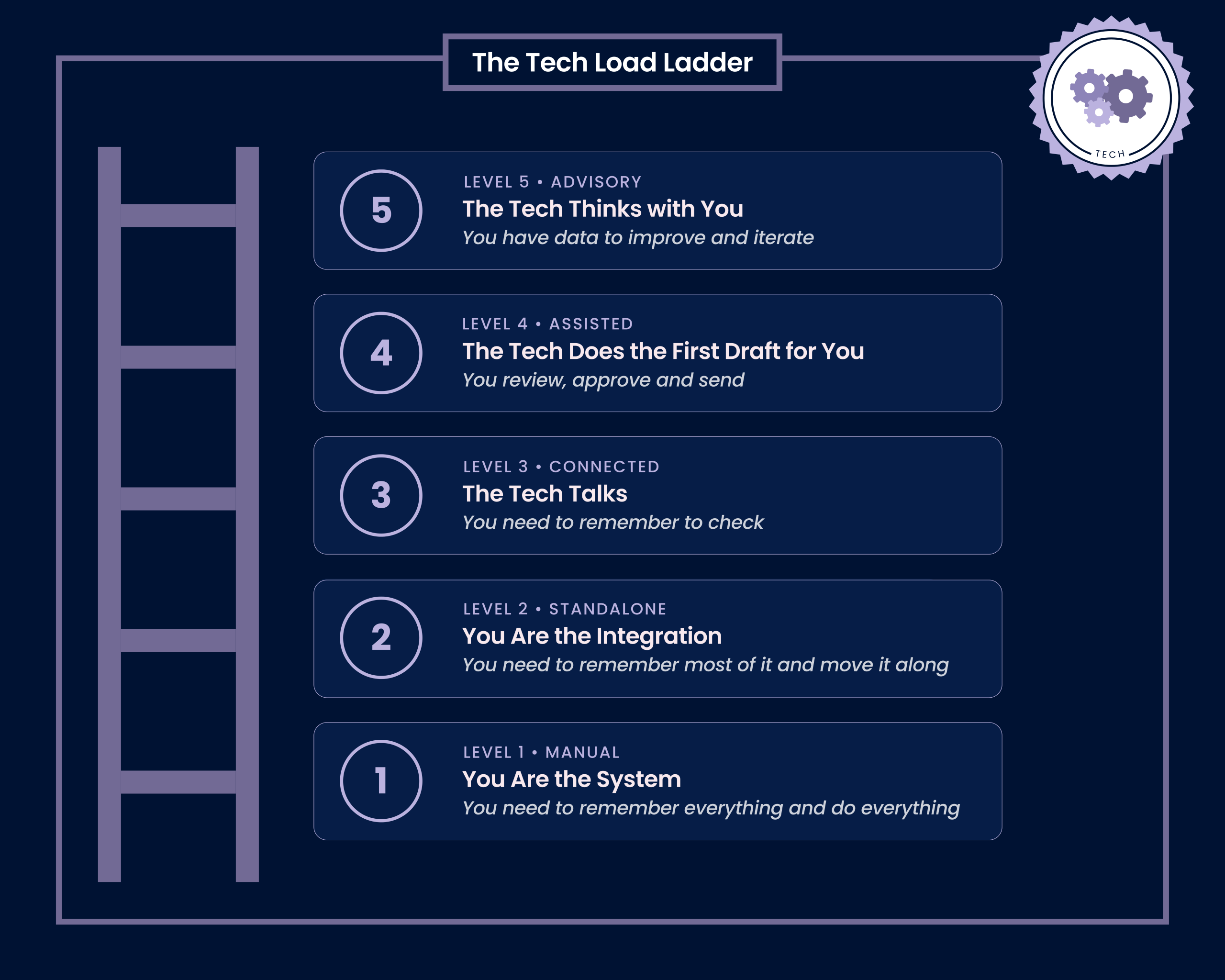
The Tech Load Ladder is a way to see that clearly. Five levels, from carrying every step yourself at the bottom to a setup that does the heavy lifting at the top, and one question sitting underneath them all: how far up do you need to go?
We'll climb all five rungs, one at a time, using a single real example so you can watch the same job get lighter as you go. By the end you'll know which rung you're on, and what the next one up would change. Let's get stuck in.
What The Tech Load Ladder Is
The Tech Load Ladder is five levels describing how much of your business is held by you, and how much is held by your tech.
At the bottom, you are the system. At the top, your tech thinks alongside you. Every rung in between hands a little more of the running over, so you're left holding less.
Climb to the rung that suits you, and stop there. You don't need the top. You need the rung that fits your business, your budget, and your season of life.
You're allowed to be on a different rung in different parts of your business, and most people are. Keep that in your back pocket, because it matters at the end.
One Example, 5 Ways
To make this real, we'll follow one job the whole way up: a single paid consulting call, the kind that ends with an action plan for the client.
It moves through five steps, and they don't change no matter how far up the ladder you go:
- Booking and payment
- Pre-call questions
- Call prep and the call
- Notes and the action plan
- Follow up
For use as an example, we'll say you are using some popular tools for each job (but these are not the only possible tools for the job):
- Calendly for bookings
- Typeform for the pre-call form
- Notion as the central record
- Zoom for the call
- Google Docs
And your trusty email inbox.
What changes at each rung is not the work. It's who holds it.
Level 1: Manual > You are the System
At level 1 there's no tech doing any joining. There's you, your calendar, your inbox, a notebook, and Zoom. Maybe a spreadsheet. You remember to invoice, you remember to follow up, you need to remember all of it.
How it runs
Booking and payment
- You email the client back and forth to find a time, then create the calendar event and the Zoom link yourself. (Time - 20 minutes)
- Then you write an invoice or payment link, send it, and keep an eye on your bank account to see whether it lands (Time - 10 minutes)
2A. And need to chase it up if it doesn't get paid. (Time - 10 minutes)
Pre-call questions
3. You email the pre-call questions (Time - 10 minutes)
3A. You chase when they don't come back (Time - 10 minutes)
Call Prep and the Call
4. You search your inbox to prep, reread their answers, conduct research (Time - 1 hour)
5. You hop on the call and take notes by hand (Time - 1.5 hours)
6. You save the recording and type your summary notes (Time - 1 hour)
Notes and Action Plan
7. You need to dig out your notes, revisit the session recording, build the action plan from a blank document, format it and email it (Time - 2 hours)
Follow Up
8. In 14 days you want to follow up, and hope you remember. (Time - 20 minutes)
Nothing is connected, because there's nothing to connect. Every join is you.
What it costs you
Around 10 things to hold in your head, and roughly 8 emails you write by hand.
The ballpark time, per client - 6.5-7 hours
Level 2: Standalone > You are the Integration
At level 2 you've bought the tools, and each one does its bit. The trouble is that none of them know the others exist.
Where this bites: The client-facing edges look smooth now, so from the outside you look sorted. Behind the scenes, you're the glue. You open Typeform in one tab and Notion in another, and you copy the useful bits across by hand. That copying is the part that falls over on a busy week, and the busy week is exactly when it matters.
How it runs
Booking and payment
- You send an email with the link. Then a paid Calendly event takes the booking and the payment together, then sends the confirmation, the calendar invite, the Zoom link, and the reminders on its own. (Time - 10 minutes)
Pre-call questions
2. You send an email with the pre-call questions hosted in Typeform, you need to remember to check that it is completed.(Time - 10 minutes)
2A. You chase when they don't come back (Time - 10 minutes)
Call Prep and the Call
3. You create a client page in Notion by hand, then export the form answers across from the other tab. (Time - 30 minutes)
4. You search your inbox for extra context, conduct research and add these notes to the above record (Time - 1 hour)
5. You hop on the call with Notion Meetings taking a transcript and summarising the meeting notes (Time - 1 hours)
6. You save the recording (Time - 10 minutes)
Notes and Action Plan
7. You revisit the notes, build the action plan from a template it and email it (Time - 1.5 hours)
Follow Up
8. In 14 days you want to follow up, and hope you remember. (Time - 20 minutes)
Each tool is solid on its own. You are the thing standing between them, carrying information from one to the next.
What it costs you
Around 6 things to hold in your head, most of them copying between tools, and around 4 emails you write by hand.
The ballpark time, per client - 5 hours
Level 3: Connected > The Tech Talks
At level 3 the tools talk to each other, and one central record (here, Notion) holds the truth.
Where this bites: The record keeps itself, which is a real relief. The catch at this rung: nothing prompts you. The information is current and correct, and you're still the one who has to remember to go and look at it.
How it runs
Booking and payment
- You send an email with the link. A paid Calendly booking creates a client page in Notion automatically, filled with their name, email, call date, and payment, and sets the status to Booked. (Time - 10 minutes)
Pre-call questions
- That new page triggers the Typeform request to go out to the client on its own.
2A. When they complete the form, their answers write straight back onto their Notion page, and the status flips to Form complete.
2B. If the form still isn't in 48 hours before the call, a reminder fires on its own, no chasing from you.
Call Prep and the Call
- You search your inbox for extra context, conduct research and add these notes to the above record (Time - 1 hour)
4. You hop on the call with Notion Meetings taking a transcript and summarising the meeting notes. This is added to the Notion record (Time - 1 hour)
5. The recording is auto-saved to the cloud and connected to the Notion record
Notes and Action Plan
- You revisit the notes, build the action plan from a template it and email it (Time - 1.5 hours)
Follow Up
- A reminder is automatically setup to follow up in 14 days, you then need to do it. (Time - 20 minutes)
You set these connections and automations up once and eliminate a significant amount of admin.
What it costs you
2 things: Prepare for the call and write the plan with 2-3 emails.
The ballpark time, per client - 4 hours
Level 4: Assisted > The tech does the first draft for you
Level 4 keeps everything at level 3 and adds a layer that works from your documented process and tells you what needs doing. That layer can be AI, or a person. The behaviour is what names the rung, not the technology.
Where this bites: By now your problem isn't storage, it's decisions. You've got a system full of correct information and a brain full of "what do I do with all this?" You want something that hands you the next step, not something that waits for you to come looking.
How it runs
Booking and payment
- You send an email with the link. A paid Calendly booking creates a client page in Notion automatically, filled with their name, email, call date, and payment, and sets the status to Booked. (Time - 10 minutes)
Pre-call questions
- That new page triggers the Typeform request to go out to the client on its own.
2A. When they complete the form, their answers write straight back onto their Notion page, and the status flips to Form complete.
2B. If the form still isn't in 48 hours before the call, a reminder fires on its own, no chasing from you.
Call Prep and the Call
- On the morning of the call, some research is conducted for you based on a standard brief. You're then handed a brief pulled from their Notion page: who they are, what they said in the form, what they paid for, and a few suggested questions and talking points. (Time - 20 minutes)
- You hop on the call with Notion Meetings taking a transcript and summarising the meeting notes and this is connected to the client page (Time - 1 hour)
5. The recording is auto-saved to the cloud and connected to the Notion record
Notes and Action Plan
- A first draft of the action plan is generated from the transcript and the form, in your structure and your format.
- You review, edit and send (Time - 1 hour)
Follow Up
- A reminder is automatically drafted for you in 14 days taking into account any additional communications between now and then, you just need to review and click send. (Time - 10 minutes)
Your job shifts from making the thing to deciding whether the drafted version is good enough.
One honest warning: this layer works from what you gave it. Point it at a process you haven't decided on, and it hands you confident nonsense, faster. That's why a documented process is the entry ticket to level 4, and why you can't skip straight here from level 2.
What it costs you
2 things: Turn up and approve what is drafted. No emails you write from scratch.
The ballpark time, per client - 2.5 hours
Level 5: Advisory > The tech thinks with you
Level 5 connects that same layer to your numbers, your past clients, and your body of previous work. Now the information doesn't only move, it feeds what you decide next
Where this bites: This is for the point where you're making real calls on gut feel at 10pm, wishing you could ask your business a straight question and get an answer worth arguing with. Which source of clients converts best? What do the people who never rebook have in common? What am I repeating in every plan that belongs in a resource instead?
How it runs
All the practical steps are the same as Level 4, with one key difference it takes that data and improves on itself.
- Your bookings are read as data: which source converts, how far ahead people book, and a flag when the pattern shifts.
- The form answers are read across every client at once, so when two thirds of a quarter name the same problem, you're told, because that's an offer signal and a content signal.
- The call notes are cross-referenced against past clients, so recurring themes surface on their own.
- The plan draft is shaped by every plan you've written before, and can tell you which kinds of recommendation tend to get implemented and which stall.
- You can ask it questions you never pre-set, like whether this call should be priced higher, or what the clients who never rebook have in common.
The same five steps run, and each one now hands something back. The thing that defines this rung: you're no longer limited to the questions you thought to build in.
Every rung you climb, your client climbs too
The Tech Load Ladder isn't only about your load.
Every manual step you're holding is usually a step your client is waiting on.
One model I always come back to is called LIFT Model, from Chris Goward at conversion.com. It looks at what helps or hurts a conversion, and two of its levers matter most here: reduce the client's anxiety, and reduce distraction, especially after they've said yes.
The fewer steps a lead has to move through to buy, the fewer chances they have to drop off, go cold, or talk themselves out of it.
Look at the booking step on our example. At level 1, a client emails you, waits for your reply, waits for three time options, picks one, waits for a confirmation, then waits for an invoice, then waits for you to notice they've paid. Every one of those waits is a gap where doubt creeps in and momentum leaks away.
At level 3 and up, that same client books, pays, and gets confirmed in a single flow, is asked good questions automatically, and gets their plan the moment it's ready. Fewer steps. Less waiting. Less "should I have gone with someone else?" in the gaps.
So climbing the ladder pays off twice. Less friction for you means a lower baseline to keep things running. Less friction for them means a smoother path to buying and being served, and less mental load carried on their side too. The join is the job, and the join helps both of you.
Putting it together
Before you take action, there are two important things to note.
First, you don't need to be on the same rung everywhere. Your marketing might be humming at level 3 while your delivery is still firmly at level 1, and that's completely normal. The gap isn't a failure. It's a map. It shows you where the next bit of effort will pay off most.
Second, you don't need to reach level 5 on anything. The top isn't a trophy. If you run two of these calls a month, level 3 is a comfortable home, and there's no prize for going further. If you run 12 a week, the higher rungs start earning their keep. At about 2.5 hours of admin each at level 1, running 12 a week is close to a full working week swallowed by coordination. At level 4 that same admin is under 20 minutes each, an afternoon across the whole week. The right rung is a question about your reality, your budget, your capacity, and your season of life, not a question about your tech.
So the business runs around you, not the other way round. That's the whole point of climbing at all.
Your action steps
Don't try to lift your whole business up a rung. Pick one process. The one that annoys you most, or the one that eats the most manual time (you already know which one it is).
Then do four things:
- Map out the steps, start to finish, the way you do it now.
- Work out which rung that process is standing on today.
- Picture what it would look like one rung up. One rung, not five.
- Note the single connection or change that would get it there.
That's the whole exercise. You don't need to do this all at once: choose one thing and start there. One process, one rung, and the load on that job gets lighter for good.
TL:DR
The Tech Load Ladder isn't about chasing the top. It's about seeing clearly how much of your business is running on you, and deciding, on purpose, how much of that you want to keep carrying.
- The five rungs go: you are the system, you are the integration, it does the work for you, it tells you, it thinks with you.
- Each rung hands a bit more of the running over, so you hold less and your client waits less.
- You're on a different rung in each part of your business, and the gap tells you where to focus.
- Level 5 is not the goal. The right rung is a reality question, not a tech one.
- You don't need to do it all at once. One process, one rung up, is a real win.
You already know where the friction is in your business. Trust that. The ladder gives you the words for it.
If you'd like a hand seeing where you're standing, that's what The Process Audit is for. In 90 minutes we map one of your systems, step by step, work out which rung it's on, and lay out your options for the next one up. You walk away with a clear picture and a plan, not a pile of homework.
If that's what you need right now, I'd love to help. You can find The Process Audit here
RELATED POSTS
DIY Process Audit
A simple six-step process audit to uncover what’s slowing your business down, streamline your workflows and free up time and headspace.
Don’t Get Another App Until you Listen to This | Episode 2
You bought the thing. You set up half of it. A month later nothing's resolved, and the subscription is still coming out every month because surely one day you'll finish it. You're not doing it wrong. When things aren't working, a new tool feels like the right answer,...
Systems Are Not What You Think They Are | Episode 1
There is no software in sight in that pantry, and that is far closer to how I think about systems in business. In this first episode of That Systems Show, I unpack what I mean by the word and why so many systems fall over. In this episode you'll learn: Why a system is...
